ONE TERM FREE ONBOARDING + GUIDED GO-LIVE
School operations, parent trust, and campus control from one connected platform.
SchoolerOS gives schools one coordinated system for admissions, attendance, fees, communication, gate security, transport, and learning, with a first-term free launch window and hands-on onboarding support.
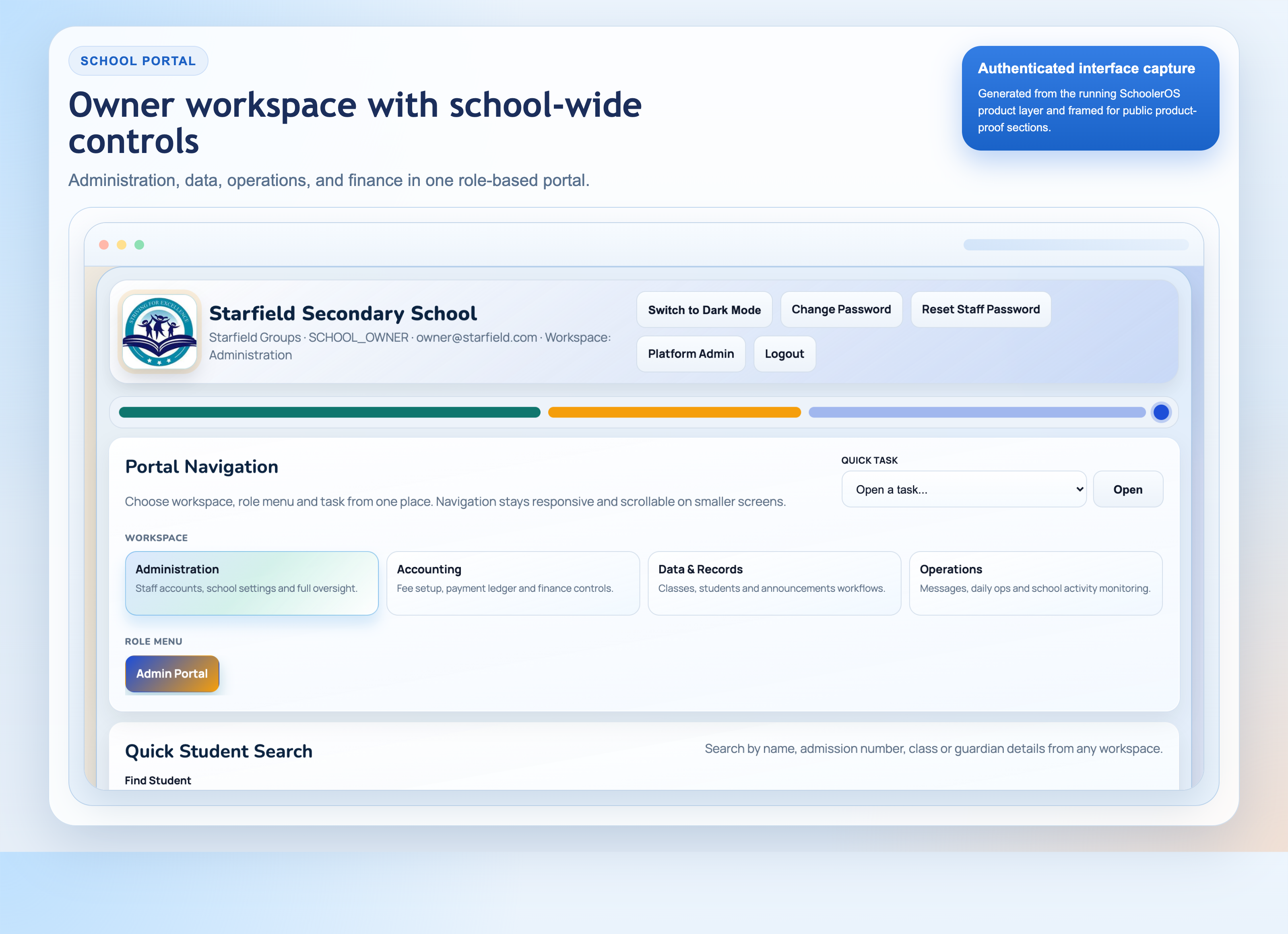
School Admin
Parent
Student
What schools launch first
WHY SCHOOL LEADERS SWITCH
A practical platform that improves the parts of school operations parents, administrators, and owners notice first.
Reduce daily operational stress
Replace scattered WhatsApp threads, spreadsheets, manual logs, and disconnected tools with one controlled workflow.
- Single operating system for records, finance, communication, and attendance
- Cleaner workflows for owners, principals, bursars, and operations staff
Make parent communication more dependable
Parents receive prompt, structured updates instead of delayed notices, fragmented messages, and guesswork.
- Gate scans, messages, results, and attachments delivered in one parent experience
- School branding stays visible across portals, messages, and subdomain pages
Launch without overwhelming your team
The platform is designed for real operators with bigger actions, clearer task flows, and guided onboarding support.
- First term usage is free while onboarding and migration happen
- Start with the modules you need first, then expand confidently
WHY SCHOOLS CHOOSE SCHOOLER OS
Big actions, simple flows, and rich visuals for non-technical operators.
PRODUCT SNAPSHOTS
Visual-first screens built for speed and confidence.
Bus Tracking Simulation
Live routeTrack morning pickup and gate arrival from operations dashboard.
Parent Alert Simulation
Push alertGate scan updates parent instantly with child status and timestamp.
QR scanned at gate
Receives school arrival alert
Adaobi Okafor arrived at school gate.
07:31 AM · Gate A ScannerCOMPANION APPS ECOSYSTEM
Four connected apps for parents, security, transport, and student learning.
Visuals below are mapped to real in-app labels from your codebase, including: “Bus Driver Console”, “Scan Ward QR”, “Pre-Trip Safety Checklist”, “Messages”, “Practice Mode”, and “CBT Test Mode”.
SchoolerOS Parent App
Parents track ward attendance, read school messages, set pickup OTP, and open result/fee attachments directly.
- Ward selector with filtered messages
- Message history, unread badge, and attachments
- Pickup OTP setup for secure checkout
Gate Security Scanner App
Security scans ward QR at the gate, confirms profile, records time instantly, and triggers parent notifications.
- Fast QR scan and profile verification
- Arrival/departure attendance capture
- Queue-ready notifications to parent app
Bus Pickup & Drop-Off App
Drivers run route trips from one console with QR-based ward events, live location updates, and emergency workflows.
- Pre-Trip Safety Checklist and route stops
- Scan Ward QR for pickup/drop-off logs
- Broadcast live location and SOS action
Student Learning App
Students and wards learn with practice, timed CBT, assignments, and lecture playback with offline-friendly flow.
- Practice Mode, CBT Test Mode, and Mock Exam
- Assignments, lectures, and result insights
- Topic breakdown and performance heatmap
SIMPLE PRICING PER PUPIL OR STUDENT
Start with a free launch term, then move into the operating level that matches your school.
Launch Term
First Term Free
₦0 / pupil-student / month (first term only)
All SchoolerOS features are unlocked during onboarding and your first launch term.
- All modules unlocked for one trial term
- Full student and staff management
- Parent app, gate scanner, CBT, and transport tools
- Data migration, onboarding, and team training
- No per-student billing during trial term
Communications Suite
Essentials
₦500 / pupil-student / month · ₦1,500 per term
Best for schools focused on communication, attendance, fee operations, and parent-facing visibility.
- Attendance, gate scanning, and arrival alerts
- Parent messaging, notices, and communication tools
- Fee operations, reports, and admin dashboards
- No student records lifecycle module
- No staff management and role assignment
- No CBT and no transport fleet suite
Campus Operations
Most popular
Standard
₦1,000 / pupil-student / month · ₦3,000 per term
For schools that need full records and campus operations workflows without advanced learning and transport modules.
- Student and staff management enabled
- Results workflows, reports, and accounting suite
- Parent app and gate attendance operations
- No advanced CBT/learning module
- No advanced transport fleet tracking
Complete School OS
Complete School OS
₦2,500 / pupil-student / month · ₦7,500 per term
Everything SchoolerOS offers, with the full platform switched on.
- Everything in Standard and Essentials
- Full CBT, mock exam, and student learning app
- Full transport fleet, route, and bus tracking suite
- Advanced analytics, audit controls, and priority support
- Best for full digital school operations at scale
READY TO MOVE FORWARD?
Register directly if your school is ready, or book a guided walkthrough if you want your team to review the platform first.
Both paths lead into structured onboarding, data migration planning, and a first-term free launch window.
GET STARTED
Pick your starting path and launch smoothly in days, not months.
For Schools
Set up your campus workspace, import records, and assign user roles in one guided flow.
- School profile and academic structure setup
- Student and staff data onboarding support
- Portal, parent app, and scanner activation
For Parent Rollout
Invite parents quickly and make attendance, alerts, and messaging available immediately.
- Parent account invitation templates
- Ward-link and profile verification flow
- Live alert and message readiness checks
Operations Impact Estimator
Estimate time and admin effort saved when school operations run on one system.
BOOK A DEMO
Choose a demo format and let our team walk you through your exact school use case.
Quick Tour
20 minutes
Best for first look by school owners and decision makers.
Operations Deep Dive
40 minutes
Covers admissions, attendance, gate operations, and reporting.
Full Platform Walkthrough
60 minutes
Includes student app, CBT workflows, and staff role controls.
DIRECT SCHOOL REGISTRATION
Need immediate onboarding? Start from the dedicated registration page.
Direct school registration
- Personalized school profile intake
- Branding and media upload links
- Pending activation until SchoolerOS review approval
- First term usage free for newly approved schools
Need help before registering?
Book a guided walkthrough for setup advice, migration planning, and rollout clarity before registration.
Book A DemoFREE TERM ONBOARDING FLOW
From day one to full go-live in guided steps.
Migration & setup
Import current school data, configure classes, roles, fees, and parent records.
Training & rollout
Train admins, teachers, bursars, and security with simple operational flows.
Live operations
Run real attendance, gate scanning, communications, and student learning.
Renewal decision
School reviews outcomes and selects Essentials, Standard, or Complete School OS.
0 Apps
Portal, Parent, Scanner, and Student Learning working together.
0 Core Roles
Super Admin, Principal, Bursar, Class Teacher, Subject Teacher, Gate Security.
0 Pricing Stages
Trial Term, Essentials, Standard, and Complete School OS.
0 Free Term
No-cost first term onboarding before per-pupil/student billing begins.
TRUST & RELIABILITY
Built for schools that need dependable support, operational control, and a team they can actually reach.
Schools usually ask one question first: will staff actually use it?
SchoolerOS is designed for non-technical operators, with large actions, guided steps, and workflows that match how real school teams already work.
The second question is whether parents will feel the difference quickly.
That is why attendance alerts, downloadable reports, assignments, fees, and school communication are visible in the parent experience from day one.
The third question is how to launch without disrupting operations.
The free first term exists to handle data migration, training, configuration, and staged rollout before the school moves into paid usage.
Talk to SchoolerOS directly, not a generic software inbox.
Book a demo, ask implementation questions, or start registration and let the onboarding desk guide the next steps.
- Email: hello@schooleros.com
- Phone: +234 800 000 0000
- Office: 65B OPEBI ROAD SALVATION BUS STOP OPEBI IKEJA, LAGOS
Structured for nursery, primary, secondary, and all-through schools.
Use one platform across single-arm schools or multi-arm institutions with different learner groups, staff responsibilities, and parent communication needs.
- Nursery and kindergarten workflows
- Primary and secondary operations
- Multi-campus and multi-segment rollout readiness
Your team can evaluate the system in live operations before long-term commitment.
That means real attendance, communication, transport, records, and finance usage during onboarding, not just a superficial demo.
CONTACT US
Share your school details and we will send the right onboarding plan.
Direct Channels
Email: hello@schooleros.com
Phone: +234 800 000 0000
Support Hours: Mon - Fri, 8:00 AM - 6:00 PM
Address: 65B OPEBI ROAD SALVATION BUS STOP OPEBI IKEJA, LAGOS
What to Include
- School name and location
- Current student population
- Modules you want to launch first
- Preferred go-live timeline
COMMON DECISION QUESTIONS
What school owners and leadership teams usually want clarified before they move forward.
Do we need to switch everything at once?
No. Most schools start with records, attendance, parent communication, and finance visibility first, then expand into learning and transport as the team settles in.
What happens during the free first term?
The free term is for onboarding, migration, training, and live operational validation. Your team uses the platform in real school workflows before long-term commitment.
What if our staff are not very technical?
The platform is intentionally designed for non-technical operators, with large actions, guided forms, simple workflows, and support during the launch period.
Can we start with a demo and register later?
Yes. Many schools book a walkthrough first, then move into registration once the owner or board is satisfied with the rollout plan and pricing stage.
Need a clearer rollout path?
See the full SchoolerOS launch roadmap from registration to migration, training, go-live, and renewal review.
Need to explain role access to leadership?
See what owners, principals, bursars, teachers, operators, and parents actually get inside the platform.
Need to see the admissions front door too?
Review how applications, document uploads, and applicant follow-up can connect directly into the school workflow.